How to Write Documentation for Both Humans and AI Retrieval Systems

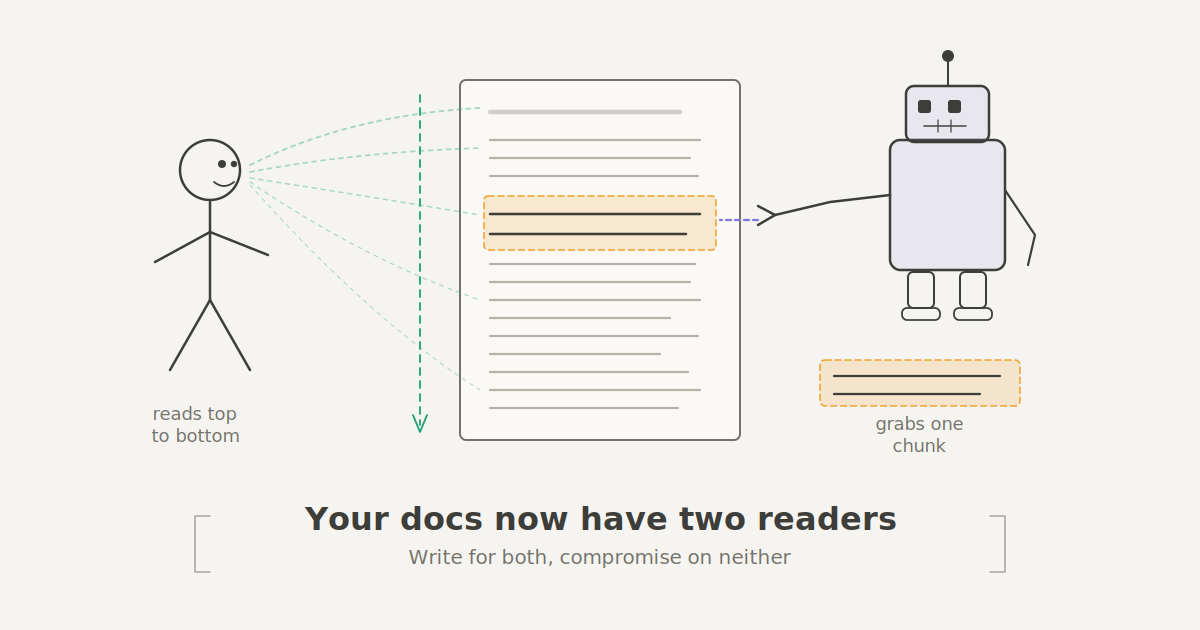
Your documentation has a new reader with no eyes. AI tools like the chatbots, IDE assistants, and Retrieval-Augmented Generation (RAG) systems now stand between your docs and the engineer who needs them. These tools chop your pages into chunks, search for relevant matches, and then generate their responses.
That means your documentation now serve two audiences: the person trying to solve a problem, and the machine trying to extract the right answer. In this post, you’ll learn how to write documentation that serves both the human and the AI retrieval systems.
Why Structure Matters in Documentation
Human and AI retrieval systems function differently during information retrieval. A human can open a page with badly structured content, scan and find the specific information they came for. But for AI retrieval systems, if the information it’s looking for is in a different heading other than the heading it came for, it retrieves the wrong information. This impacts the quality of the output.
This kind of documentation was written for linear reading, and these AI retrieval systems don’t work that way. Even for a human, that’s bad structure. This is why it's important to be deliberate about where answers to questions live in documentation.
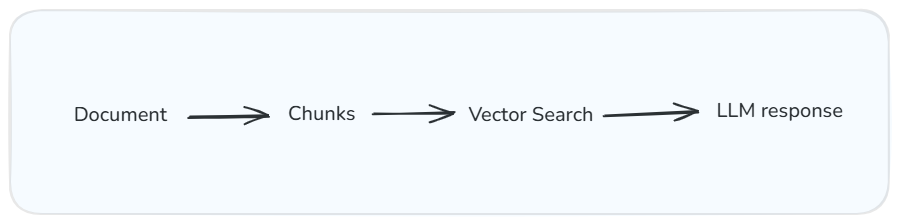
How RAG systems process your documentation: chunk, search, generate. The quality of the output depends on how well each chunk stands on its own.
What Each Reader Actually Needs
The Human Reader
When a reader opens a documentation page, they have a problem they want to solve. In doing that, they don’t want to read more than they have to. They need enough context to solve their problem.
Good documentation should explain ideas that build on each other. With headings, spacing, and code blocks in place, the mental effort needed to parse information is reduced. The Nielsen Norman Group's research on the inverted pyramid confirms what most tech writers already feel: people scan first and read second. They want to understand the core idea before the deep implementation.
This principle is called progressive disclosure. You start with the simplest version of the explanation and gradually layer the complex parts. This reflects how people actually learn.
The Machine Reader
For the chatbot or RAG tool, it’s a different ball game. It doesn’t start at the top and build understanding. It breaks your page into chunks, searches for the most relevant match to the query, and uses what it finds to generate a response. This means each section has to stand on its own. If a section depends on a context from three sections earlier, the retrieval system will respond without it, and the reader gets an incomplete answer.
RAG systems perform better when they receive self-sufficient sections with clear headings and consistent metadata that indicate what each page covers.
An example is an engineer asking an AI assistant: “How do I roll back a failed deployment on Y?”
Consider these two versions of the documentation:
Version A — Page title: Release Workflow. Section heading: Post-deployment considerations.
Version B — Page title: Roll back a failed deployment. Section heading: How to roll back a deployment. Tags: deployment, rollback, >incident response.
Version B makes it easy for both humans and machines to find the right answer.

Same document, two completely different reading patterns. One reads linearly. The other grabs and runs.
Where the Two Readers Clash
Some best practices for human readers aren’t for AI retrieval systems. An example is progressive disclosure. Humans benefit from getting the context before the answer, and this feels natural. It’s like getting a good explanation from a colleague. But with AI retrieval systems, it doesn’t care about your buildup. It wants the answer straight up. If you lead with context and bury the solution four paragraphs down in an unrelated heading, the system would grab the preamble and miss the instructions.
Let’s say you’ve written a section on "configuring retry policies". A human reader would benefit from the first paragraph explaining why the retry policies matter. But for an AI retrieval system, it just needs: "Set maxRetries to 3 and backoffMultiplier to 2.9 in your service config.” Looking at that, both readers need that information, but in a different order.
To make it serve them both, restructure each section so the answer comes first, followed by the context. Journalists have done this for over a century, and it’s called the inverted pyramid. The machine gets its clean answer while the human gets their narrative.
Five Structural Rules That Serve Both Readers
You don’t need to rewrite everything. You should make these changes:
1. Every Section Should Answer One Specific Question
Before you write any section, ask yourself: “What question is this section answering?”
Then drive at answering that question.
When a section answers one question, the human readers can scan the table of contents and jump straight to what they need. The same goes for the AI retrieval system; it can match the section directly to the query without parsing unnecessary information.
The Diátaxis framework applies a similar principle at the page level, separating documentation into tutorials, how-to guides, reference, and explanation. This idea scales down to individual sections, too.
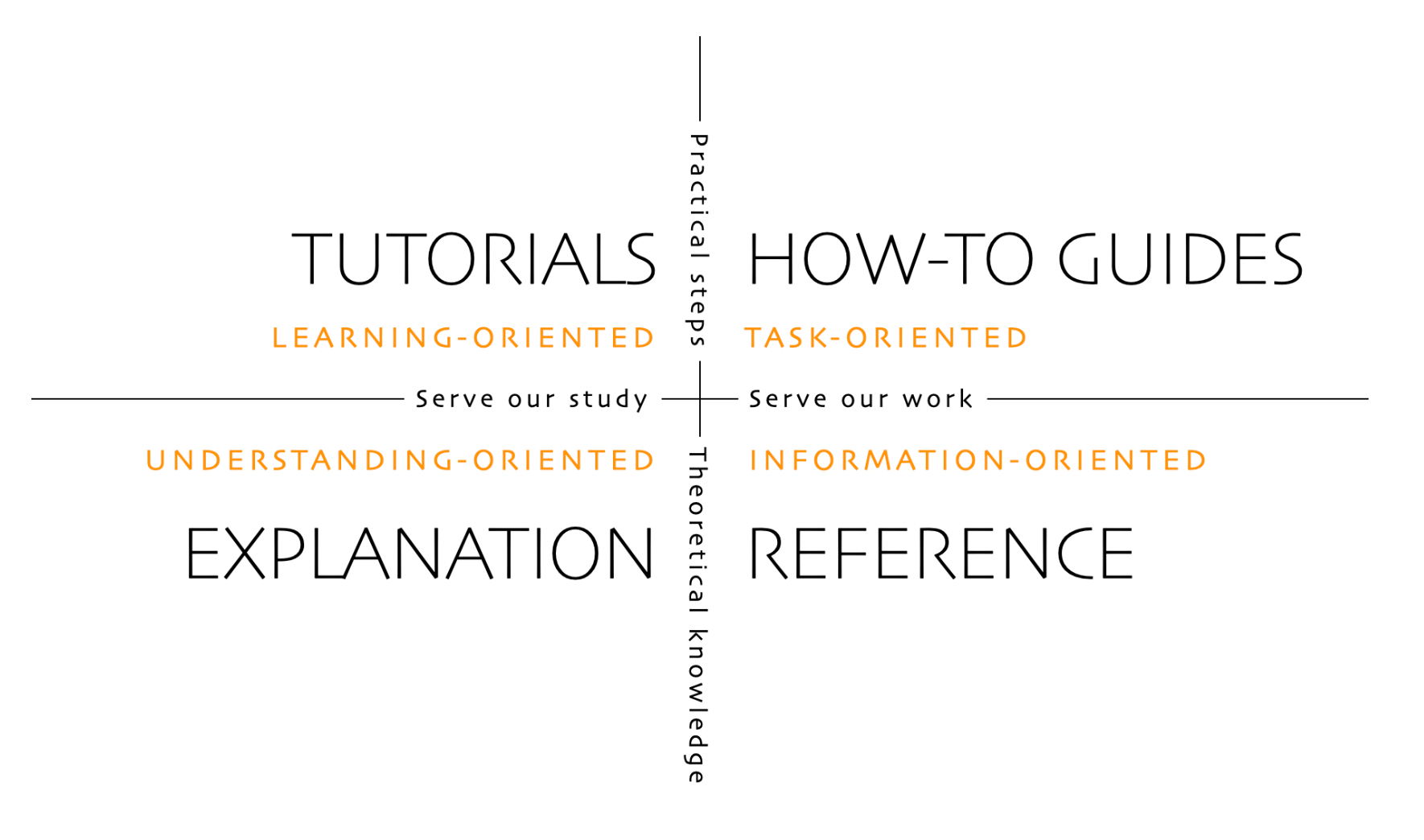
The Diátaxis Framework
2. Write Headings Like Search Queries
Writing vague headings forces the reader to open the section and scan through to decide if it’s relevant or not. They also make it nearly impossible for an AI retrieval system to match the section to a query.
The Google developer documentation style guide recommends the use of task-based headings that describe what the reader will accomplish. This serves the AI retrieval systems just as well.
3. Open Every Section with the Answer
Opening every section with the answer is a high-impact change you can make. It’ll feel wrong at first, but for documentation, you aim to solve a problem and not write too much prose as you’d do in a novel.
Open with the key ideas in the first sentence, then use the rest of the section to explain and give more context with examples. Your answer is now at the frontline. The human reader immediately knows they’re in the right place, and the AI retrieval system has the correct answer in the first chunk it grabs. This mirrors the inverted pyramid structure that's been the backbone of news writing since the telegraph era.
4. Make Every Code Example Self-Contained
Using phrases like “as configured in the previous section” might not work for AI retrieval systems. When adding code examples, include everything needed to understand or run the example right there, like the import statements, variable definitions, and configuration values. Yes, looks like repetition, but it’s worthwhile.
5. Write Metadata Like You're the One Searching
Metadata is the first thing search systems and AI retrieval systems use to decide whether your page is relevant. You could structure every section well, but none of it matters if readers can’t find your page in the first place. Metadata is what gets your documentation into the room.
Before and After
Here's the same documentation written two ways.
Before (traditional narrative structure):
Working with Retry Policies
Retry policies are an important part of building resilient services. When a request fails due to a transient error, such as a network timeout or a temporary service outage, a retry policy determines whether and how the system attempts the request again.
There are several factors to consider when configuring retries, including the maximum number of attempts, the delay between attempts, and whether to use exponential backoff.
To configure a retry policy, set
maxRetriesto 3 andbackoffMultiplierto 2.0 in your service configuration file.
A retrieval system grabbing the first paragraph gets a general explanation with zero actionable content. The actual instruction is buried at the bottom.
After (structured for both readers):
How to Configure a Retry Policy for Transient Failures
Set
maxRetriesto 3 andbackoffMultiplierto 2.0 in your service configuration file. This ensures failed requests are retried with increasing delays, preventing cascading failures.Retry policies handle transient errors like network timeouts and temporary outages. Without them, a single failed request surfaces as a user-facing error even when the issue resolves in milliseconds. Exponential backoff — doubling the wait between each retry — gives the downstream service time to recover without piling on additional load.
This example shows they both have the same information and depth, except that in the second, the answer comes first. An AI retrieval system grabs the solution on the first pass. A human gets the answer immediately and reads on to understand why.
Another example can be seen in this image below:
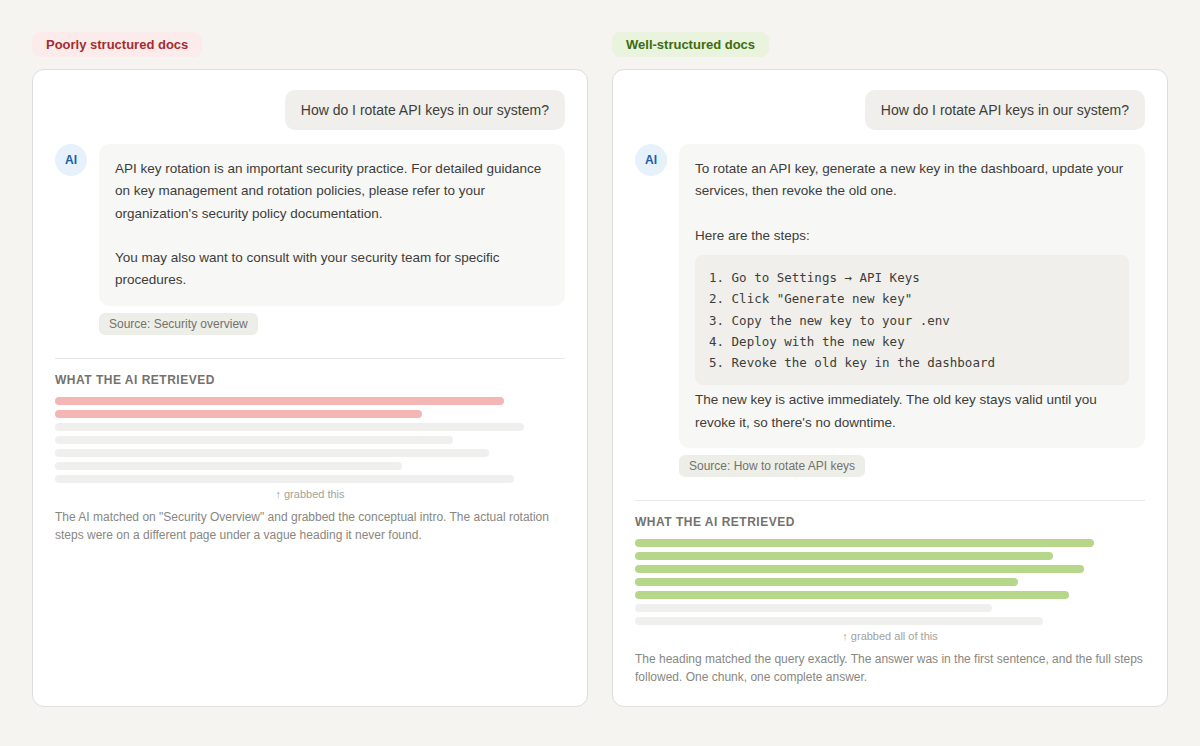
The difference between a useless chatbot response and a helpful one often comes down to where the answer sits in the section
Conclusion
To make your documentation fit for both human and AI retrieval systems, don’t overhaul everything at once. Pick your most visited page and start from there. Audit it against these five rules. Restructure it and watch whether the AI retrieval systems and engineers get better answers. Then do the next page. Teams that structure documentation for both the human and machine readers are building knowledge bases that actually scale.